Commands
Explore what each treemand command does, with short animated demos for each.
| Command | What it does |
|---|
| Tree output | Discover and display any CLI’s command hierarchy |
| Output formats | JSON and YAML for scripting and tooling |
| Interactive TUI | Keyboard-driven explorer — browse, pick flags, run commands |
| cache | List and clear the discovery cache |
| config | View, validate, and change configuration |
| version | Print version and build info |
| completion | Generate shell completion scripts |
Tree Output
treemand <cli> discovers any CLI’s full command hierarchy and renders it as a
color-coded tree. Point it at anything: git, kubectl, docker, aws, your
own tools.

Basic usage
treemand git                        # full tree at default depth (3)
treemand --depth=2 kubectl          # limit recursion depth
treemand --filter=remote git        # only show nodes matching pattern
treemand --exclude=help git         # hide nodes matching pattern
treemand --commands-only kubectl    # subcommands only — no flags or positionals
Display styles
Four styles, switchable with --tree-style or T inside the TUI:
treemand can emit the discovered tree as JSON or YAML for scripting, diffing,
and integration with other tools.

Usage
treemand --output=json git          # full tree as JSON
treemand --output=yaml git          # full tree as YAML
treemand --output=text git          # default colored text tree
JSON schema
{
  "name": "git",
  "description": "the stupid content tracker",
  "flags": [
    {"name": "--version", "value_type": "bool", "description": "Print version"}
  ],
  "positionals": [],
  "children": [
    {
      "name": "commit",
      "description": "Record changes to the repository",
      "flags": [
        {"name": "--message", "short_name": "m", "value_type": "string"}
      ],
      "positionals": [],
      "children": []
    }
  ]
}
Scripting with jq
# List all top-level subcommands
treemand --output=json --depth=1 git | jq '[.children[].name]'

# Find all flags of a specific subcommand
treemand --output=json git | jq '
  .children[] | select(.name == "commit") | .flags[].name'

# Count flags per subcommand
treemand --output=json --depth=1 kubectl | jq '
  [.children[] | {cmd: .name, flags: (.flags | length)}]'

# Extract commands with descriptions
treemand --output=json --depth=1 docker | jq '
  [.children[] | {name, description}]'
# Store a CLI's schema as YAML
treemand --output=yaml kubectl > kubectl-schema.yaml

# Diff two versions of a CLI's command surface
treemand --output=json --depth=3 aws > aws-before.json
# (upgrade aws cli)
treemand --no-cache --output=json --depth=3 aws > aws-after.json
diff aws-before.json aws-after.json
Interactive TUI (-i)
The interactive mode launches a full-screen terminal explorer with three panes:
a live preview bar, a navigable tree pane, and a help pane that shows
--help output for the currently selected node.

Launch
treemand -i git
treemand -i kubectl
treemand -i docker
Workflow
- Navigate —
↓/↑ (or j/k) to browse; cursor never auto-expands - Expand —
→ opens a node, press again to enter its children - Pick a command —
Enter sets it in the preview bar - Add flags —
f to open the flag picker; Enter on a flag row adds it directly - Fill positionals —
Enter on a positional row opens an input prompt - Copy or run —
Ctrl+E opens a confirmation modal: copy to clipboard or execute
Key bindings
Navigation
| Keys (arrows) | Keys (vim) | Keys (WASD) | Action |
|---|
↑ / ↓ | k / j | w / s | Move up / down |
→ | l | d | Expand node; enter children on 2nd press |
← | h | a | Collapse node; go to parent on 2nd press |
Shift+→ | Shift+L | Shift+D | Expand entire subtree |
Shift+← | Shift+H | Shift+A | Collapse entire subtree |
gg | | | Jump to top |
G | | | Jump to bottom |
Toggle navigation scheme with Ctrl+S (arrows → vim → WASD).
treemand cache
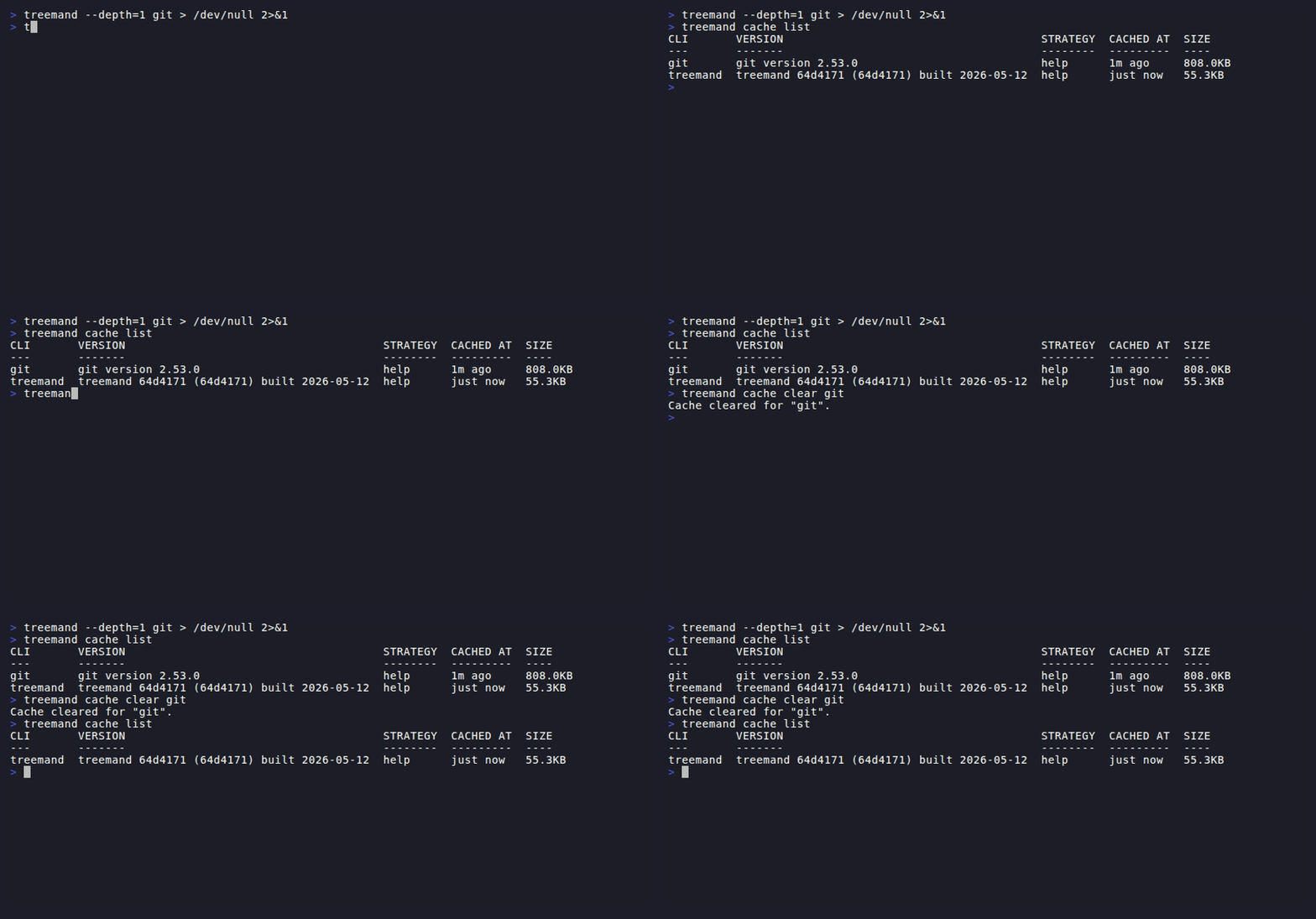
treemand caches discovered CLI trees in an SQLite database so repeat lookups are
instant. The cache subcommand lets you inspect and manage those entries.
Commands
treemand cache list           # list all cached CLIs with age and size
treemand cache clear git      # clear the cached entry for git
treemand cache clear          # clear all cached entries
Cache details
| Property | Value |
|---|
| Location | ~/.treemand/cache.db |
| Format | SQLite |
| TTL | 24 hours |
| Cache key | CLI name + version string + discovery strategies |
Bypassing the cache
treemand --no-cache docker       # skip cache for this run
TREEMAND_CACHE_DIR=/tmp treemand git   # use a custom cache directory
The cache key includes the CLI’s version string (from <cli> --version), so
updating a CLI automatically invalidates its cached tree on the next run.
treemand config
Manage treemand’s optional YAML configuration file without opening it manually.

Commands
treemand config view               # show merged config + file path
treemand config validate           # check for errors or unknown keys
treemand config validate --strict  # treat warnings as errors
treemand config set <key> <value>  # write a value to the config file
treemand config init               # create a commented default config
treemand config init --force       # overwrite an existing config
treemand config path               # print the config file path
treemand config edit               # open config in $EDITOR
Config file locations
treemand searches for the config file in this order:
treemand version
Print the version, git commit, and build date of the installed binary.

Usage
treemand version
# treemand v0.3.0 (abc1234) built 2026-05-11
The version is embedded at build time from the git tag (git describe --tags).
Development builds show dev when no tag is present.
treemand completion
Generate shell completion scripts for bash, zsh, fish, or PowerShell. Once set
up, pressing Tab after treemand suggests CLIs you’ve already explored from
the cache.

Setup
Bash
# Add to ~/.bashrc
source <(treemand completion bash)
Zsh
# Add to ~/.zshrc
source <(treemand completion zsh)
Fish
treemand completion fish > ~/.config/fish/completions/treemand.fish
PowerShell
# Add to your PowerShell profile
treemand completion powershell | Out-String | Invoke-Expression
How it works
The completion script hooks into your shell’s completion system. When you type
treemand [Tab], it suggests CLI names from the discovery cache — so the more
CLIs you explore, the more useful tab-completion becomes.